Role:
Ux Designer
App design for local pet grooming company, allowing clients to book appointments online and purchase pet care products.
Type:
Website redesign
Tools:
The Little Bookroom Website Redesign
Interview, Affinity Mapping, User Flows. Sketching, Wireframing, Prototyping
The Brief:
Redesign The Little Bookroom’s website to improve navigation, usability, and discoverability, enabling customers to easily find and purchase curated children’s books, while maintaining the brand’s small-shop feel and trusted customer experience.
The Research:
I began with a research phase combining user interviews, usability testing of The Little Bookroom's current site, and competitor research, to understand user needs, current pain points, and where competitors were outperforming the site.
Research Method 1: User Interviews
I interviewed four participants, all based in inner-city Melbourne with experience buying children's books online. The interviews were structured around four areas:
General book-buying habits
Expectations of book websites and product pages
What makes a site feel trustworthy and how they choose where to purchase
Shopping locally versus with big retailers

Six key insights emerged from synthesising the interviews:

1. Trust & Credibility: were crucial, with users relying on a strong range and clear stock availability

3. Research & Recommendations: users researched books online before purchasing.

4. Navigation & Search Behaviours: Users were highly task-focused and expected strong search, filtering, and relevant recommendations.

5. Shopping Local vs. Big Retailers: participants wanted to support local businesses, but usually shopped with bigger retailers due to convenience.

2. Price Sensitivity & Value: convenience, price, and shipping costs heavily influenced decisions.
6. In-store vs. Online Behaviours: although participants enjoyed browsing in-store, they preferred online shopping for speed and again, convenience.
Research Method 2: Usability Testing of Current Site
I also ran usability testing on The Little Bookroom's current site with the same four participants, asking them to find a picture book for a three-year-old girl who enjoys imaginative stories with bright illustrations and simple, engaging text.
All four participants hit similar friction points:




Navigation:
All wanted to start with an age filter — unavailable
All then looked for secondary and tertiary filters — also missing
Existing categories felt irrelevant and misaligned with how they shop.
Product Pages:
Contained a lot of irrelevant information
Lacked internal previews
No smart recommendations.
Search Function:
Too specific
Results not relevant
Too many pages returned
Checkout:
No guest checkout option
Shipping costs only shown at the end of the flow
Research Method 3: Competitor research
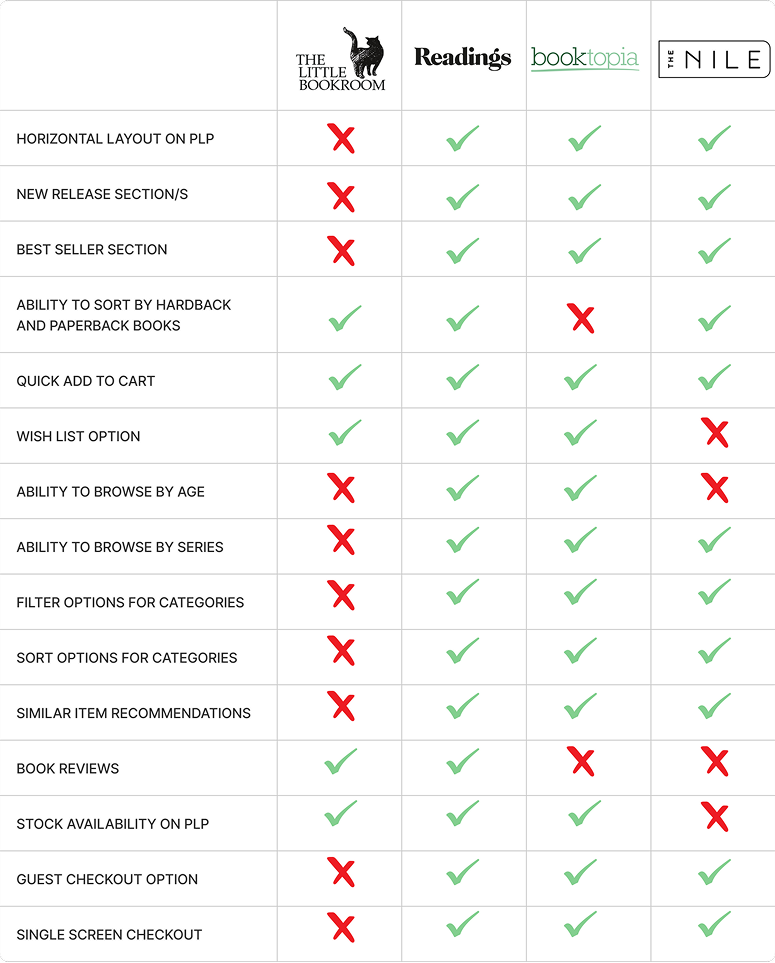
I ran competitor research using a features inventory and pluses-and-deltas analysis across three book retailers. Similar themes emerged:
Navigation: Competitors allowed browsing by age, series, new releases, and bestsellers, with stronger filtering and sorting
Homepage, PLP, and PDP: competitor pages featured book and author spotlights, store recommendations, reviews, and similar-item suggestions, including internal previews users were seeking
PLP layout: all competitors used a horizontal layout, compared to The Little Bookroom's vertical layout, allowing users to view and compare more books on one screen
Checkout: competitors offered simplified, one-page checkout flows, guest checkout, and clearly visible shipping costs throughout
The Persona:
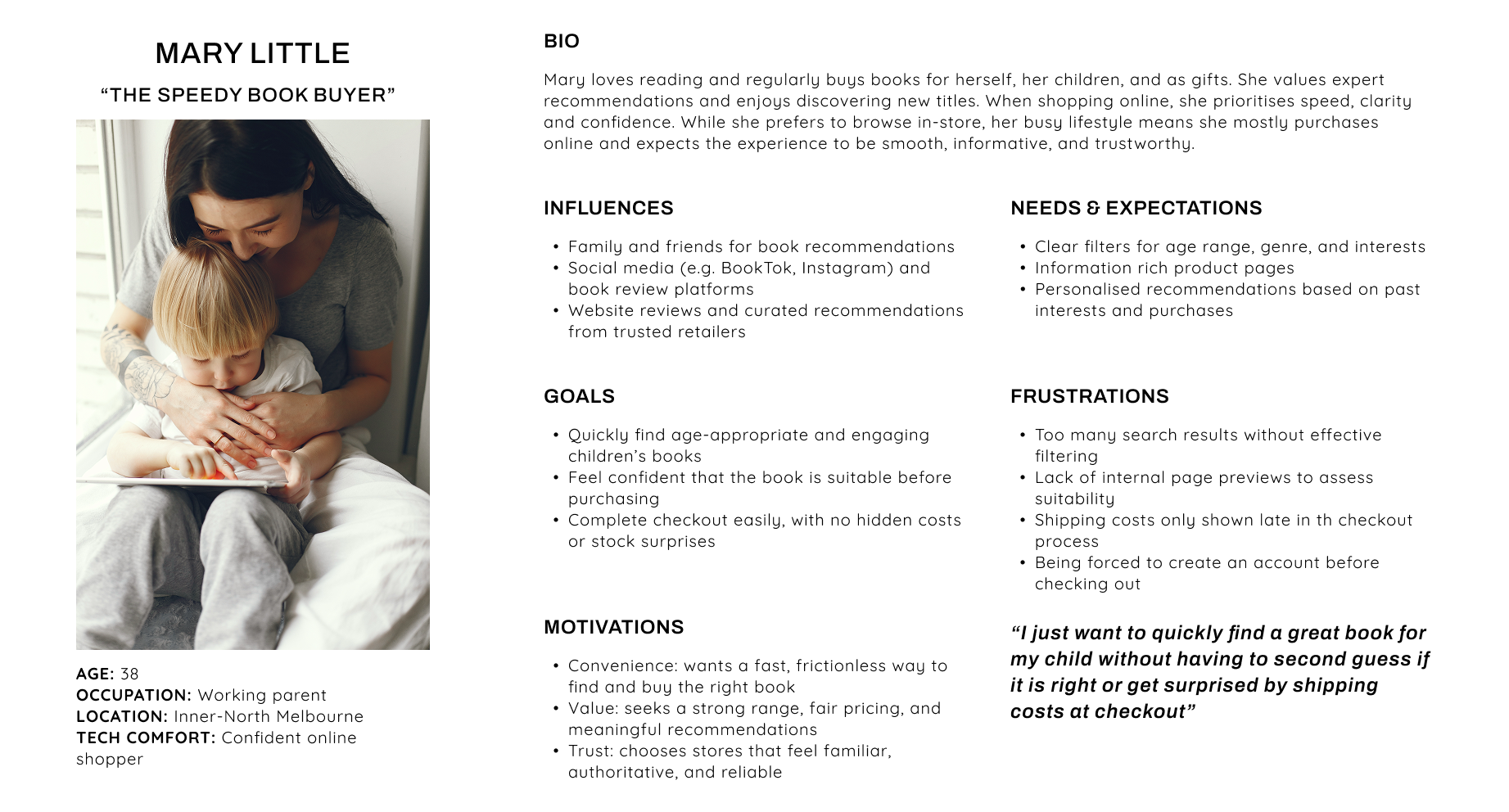
Using these research insights, I created the persona “Mary Little, the Speedy Book Buyer”.
Buys books for her children and as gifts, and expects a fast, clear, trustworthy experience
Wants to quickly find age-appropriate books and feel confident before purchasing
Relies on filtering, reviews, and recommendations to guide decisions
Highly convenience-driven, frustrated by poor filtering, unclear shipping costs, and forced account creation
Across interviews, usability testing, competitor research, and the persona, one consistent problem emerged: Book buyers struggle to determine whether a book is right for them when purchasing online.
This led to the problem statement being defined as:
The Problem:
Time poor parents need to quickly determine if a book is age appropriate and engaging for their child in order to confidently purchase online
Navigation:
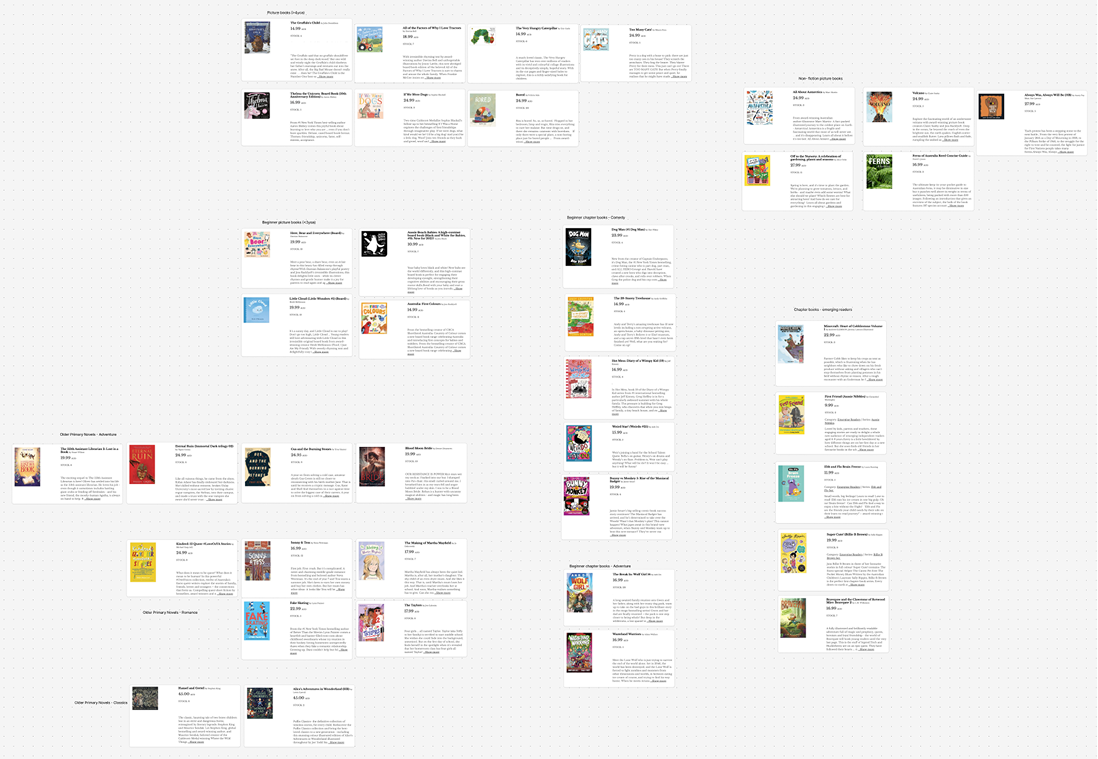
Open Card Sort:
I conducted an open card sort with 3 participants and found:
All participants started by grouping books into age ranges first.
All participants then created sub-categories like non-fiction, classic tales and stories around social issues.
This was quite different from how the current website is structured.
This showed a clear gap between how users expect to browse and how the site is currently structured.
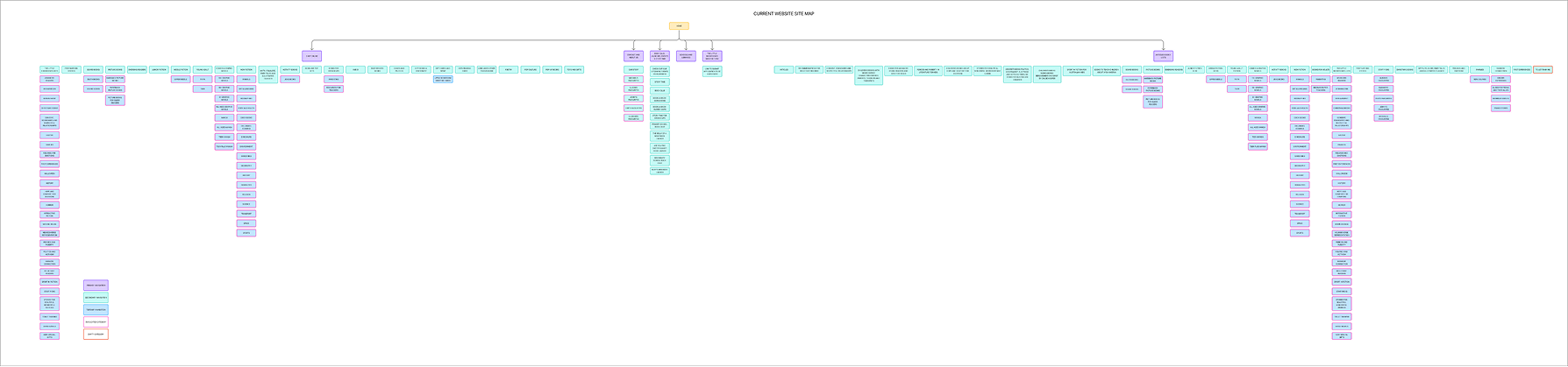
Site Map:
The issues became even clearer when I mapped out the current site’s navigation structure
The global navigation was duplicated, “shop online” and “articles & booklists” essentially led to very similar secondary navigation items, which added confusion to the site.
The secondary navigation was also very wide and included a lot of niche categories that weren’t supported by my research.
Most importantly, there was no clear way to browse by age, which was the starting point for every participant and something all competitors offered.
Overall, the structure did not align with how the user approached buying children’s books online.
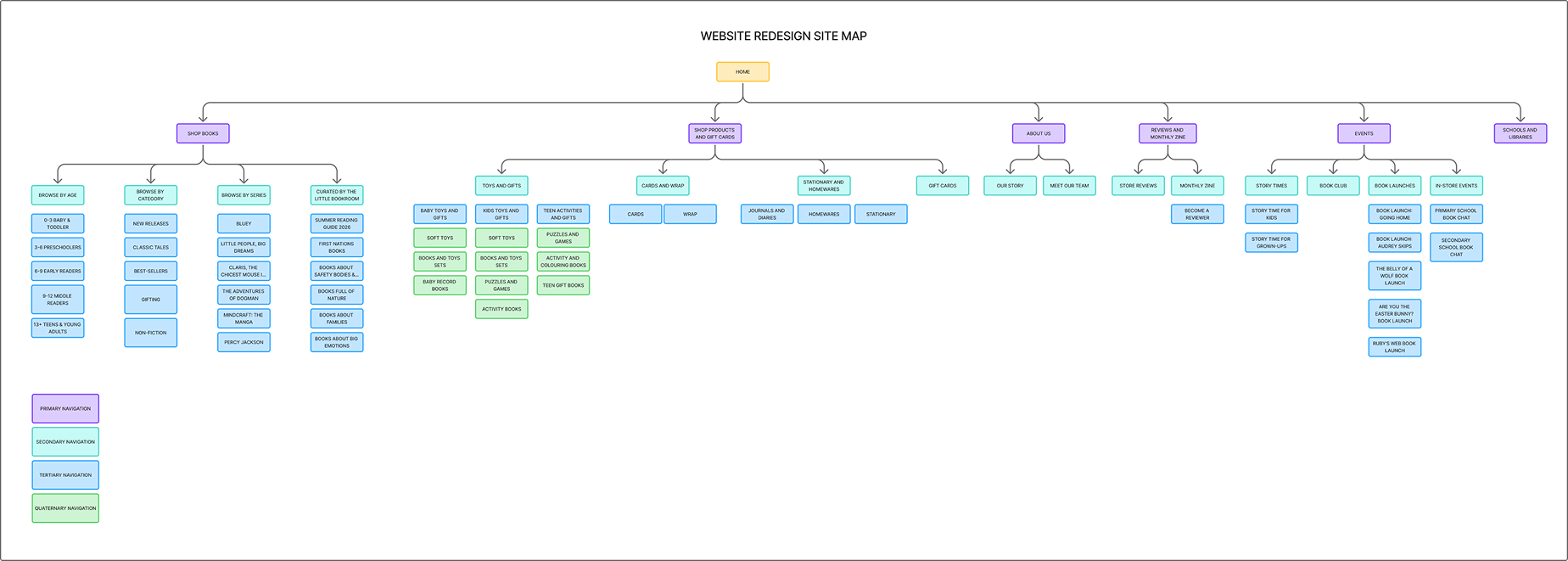
In my redesigned site map, I focused on simplifying and grouping secondary navigation into broader, more relevant categories.
This allowed for more detailed sub-categories to sit underneath, without overwhelming the top-level navigation.
I made sure users could first browse by age,
as well as meaningful categories like “New Releases”, “Classic Tales” “Non-fiction”,
“Popular Series” and
“Curated Lists” - which was also inline with competitors.
The goal was to create a clearer structure that supports how users naturally shop
User Flow:
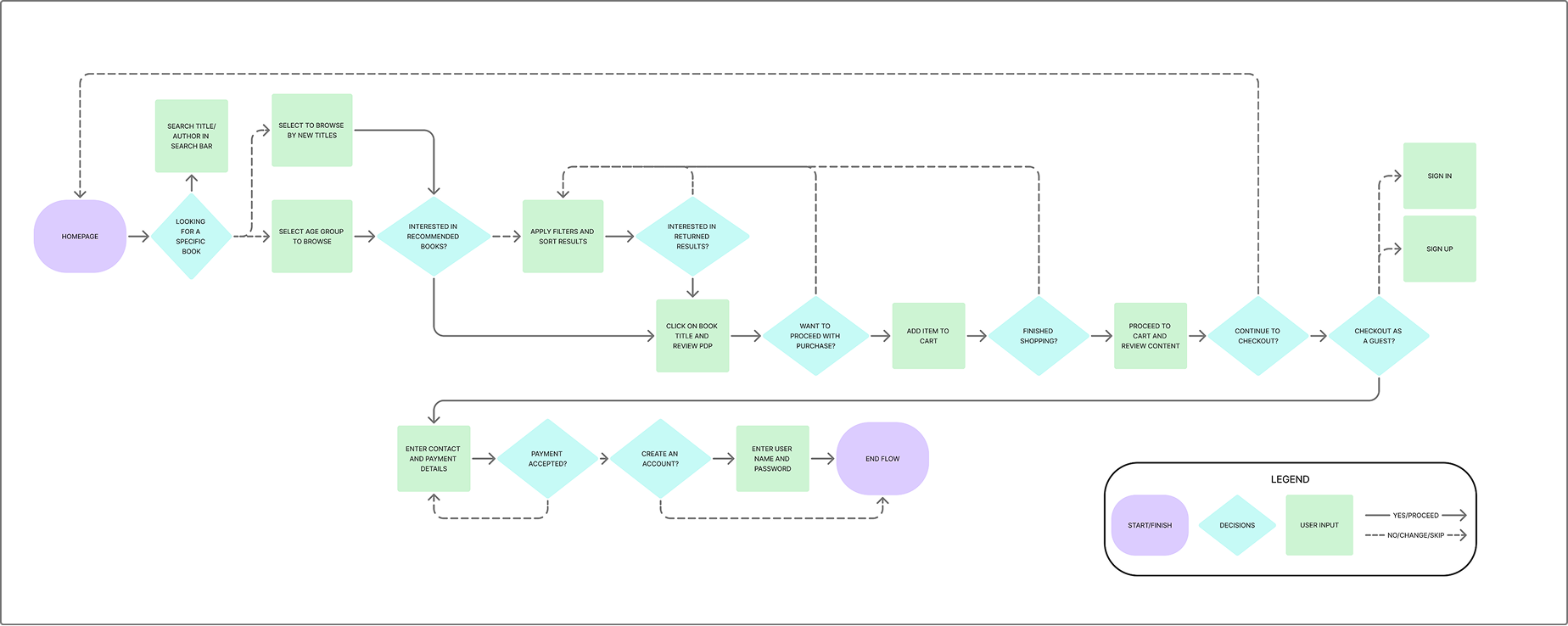
I then mapped a user flow for someone shopping for a child, but not a specific book.
Users typically begin by selecting an age group, then browse or apply filters.
They review the product page to validate suitability, then add to cart and checkout, often as a guest.
This ensured the design supported a fast and confidence-driven journey.
Ideation:
Sketches:
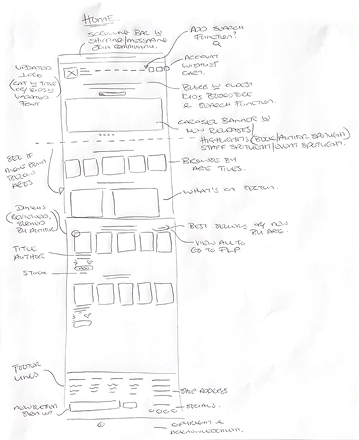
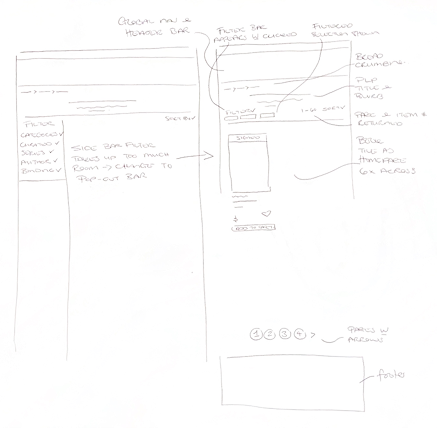
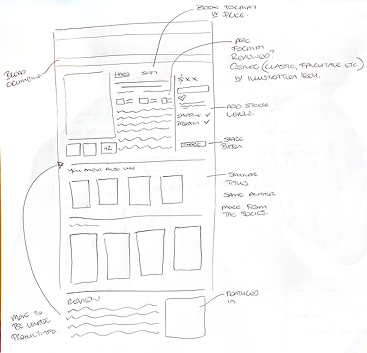
I started the design phase by sketching the key pages: homepage, PLP, PDP, and checkout.
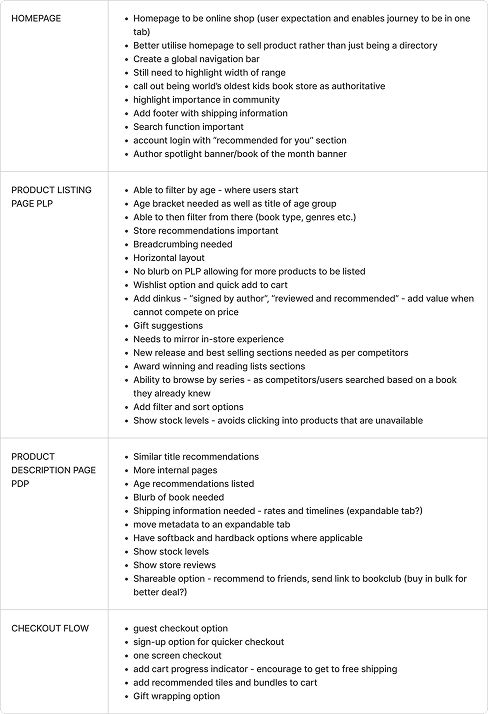
I used a checklist of research insights to ensure each design addressed the users pain points that I had identified.
Wireframes:
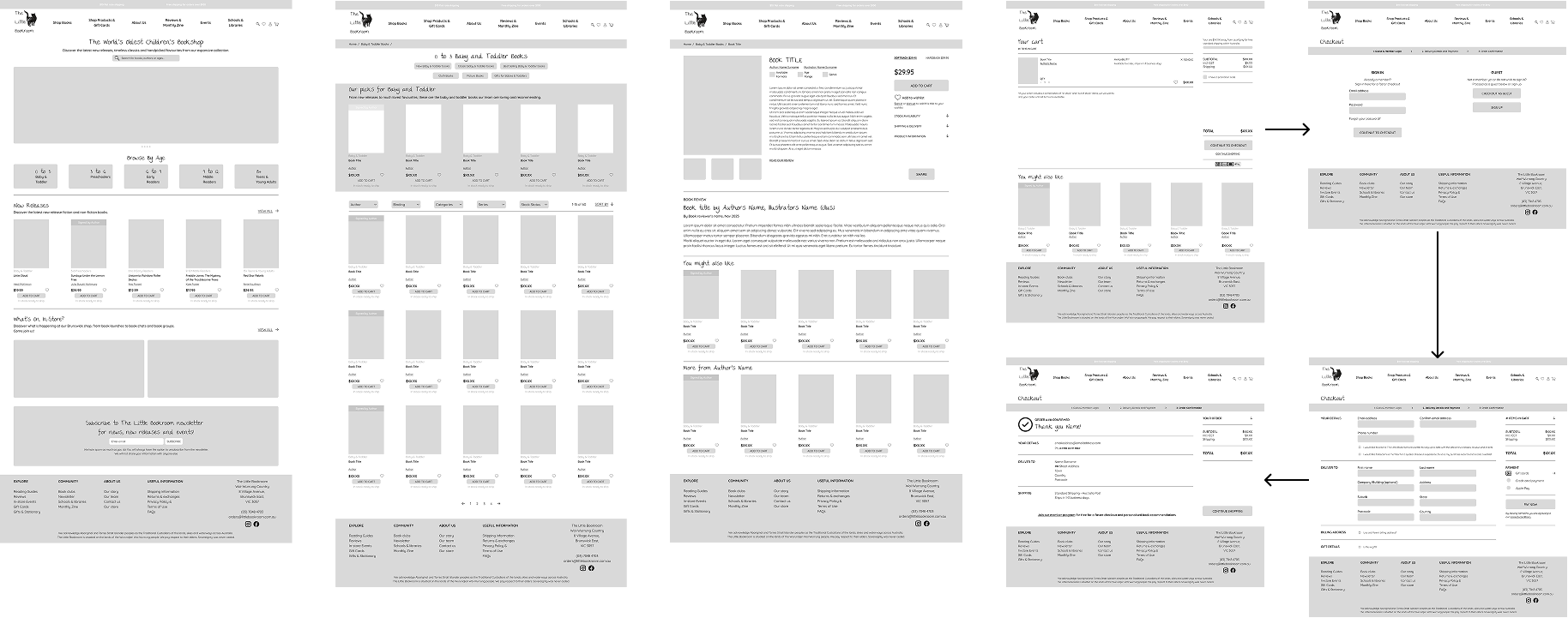
From these sketches I developed wireframes, refining layout and hierarchy as I progressed.
In particular, I iterated on the filter bar design and placement on the PLP, as filtering was one of the most critical usability issues identified in my research
Usability Testing:
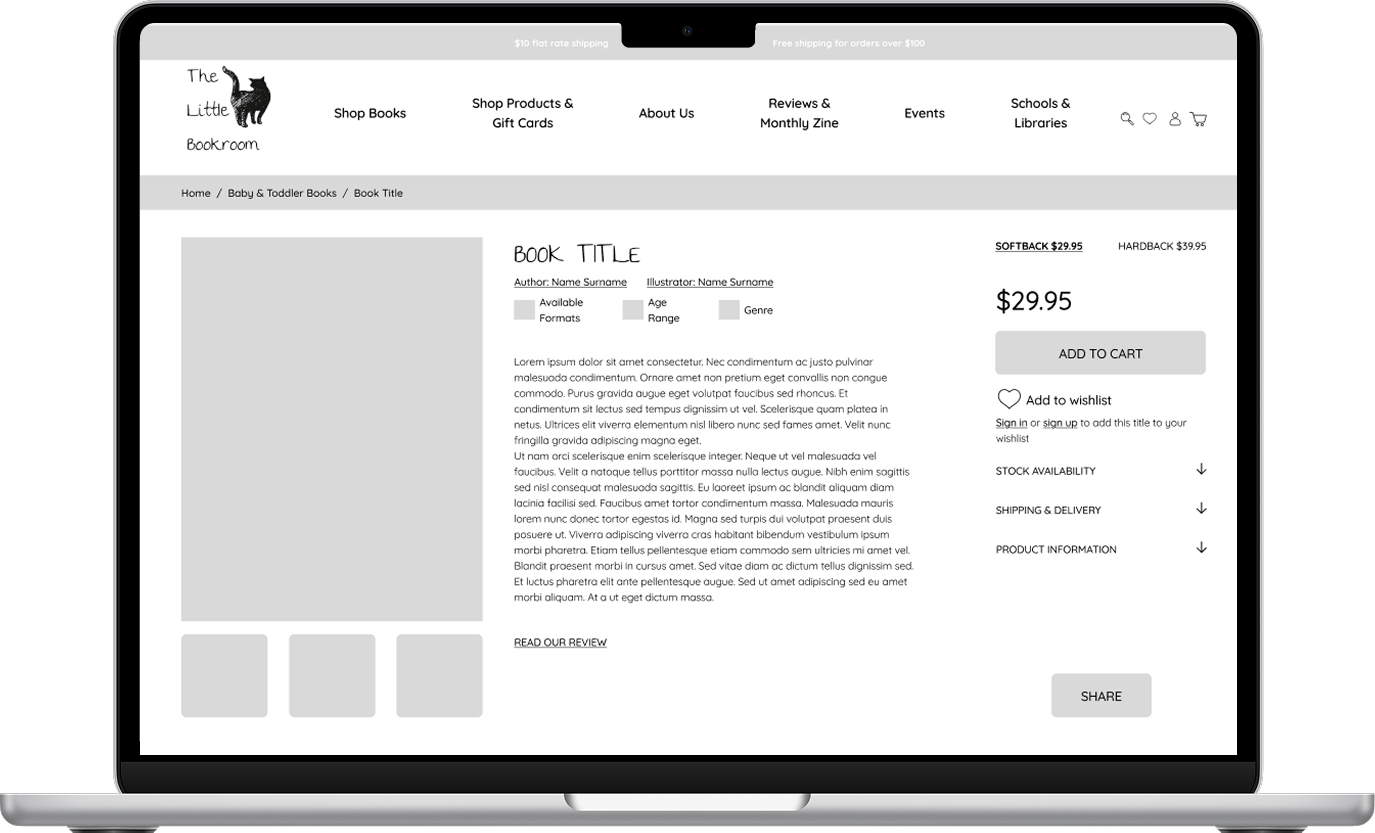
I then tested the wireframes in a low-fidelity prototype with three participants, to ensure the navigation was intuitive and users could easily find a suitable book for a two-year-old.
All participants were able to quickly identify the correct age group from the homepage and move through browsing and checkout without major issues.
When asked why they selected the homepage age tile rather than the global navigation, they said the tile was more visually prominent, but they understood and would also use the global navigation if needed.
When asked how they would search for a specific genre as well as age, participants said they would search using keywords first, then refine using filters, which this structure supports.
Participants also responded positively to the smart recommendations, such as “More from this author” and “You might also like,” and said these would help them discover additional books.
Overall, users were able to quickly browse, evaluate, and confidently select a book, with clear age labelling, relevant information, and simplified checkout.
The Design:
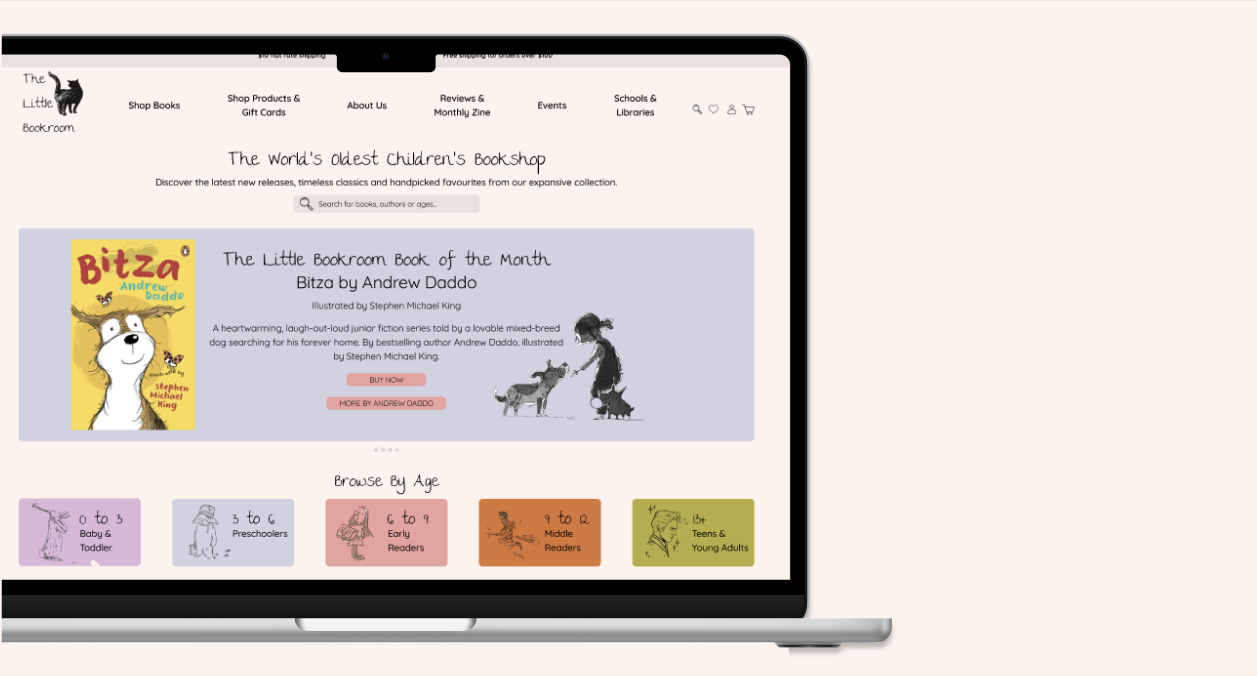
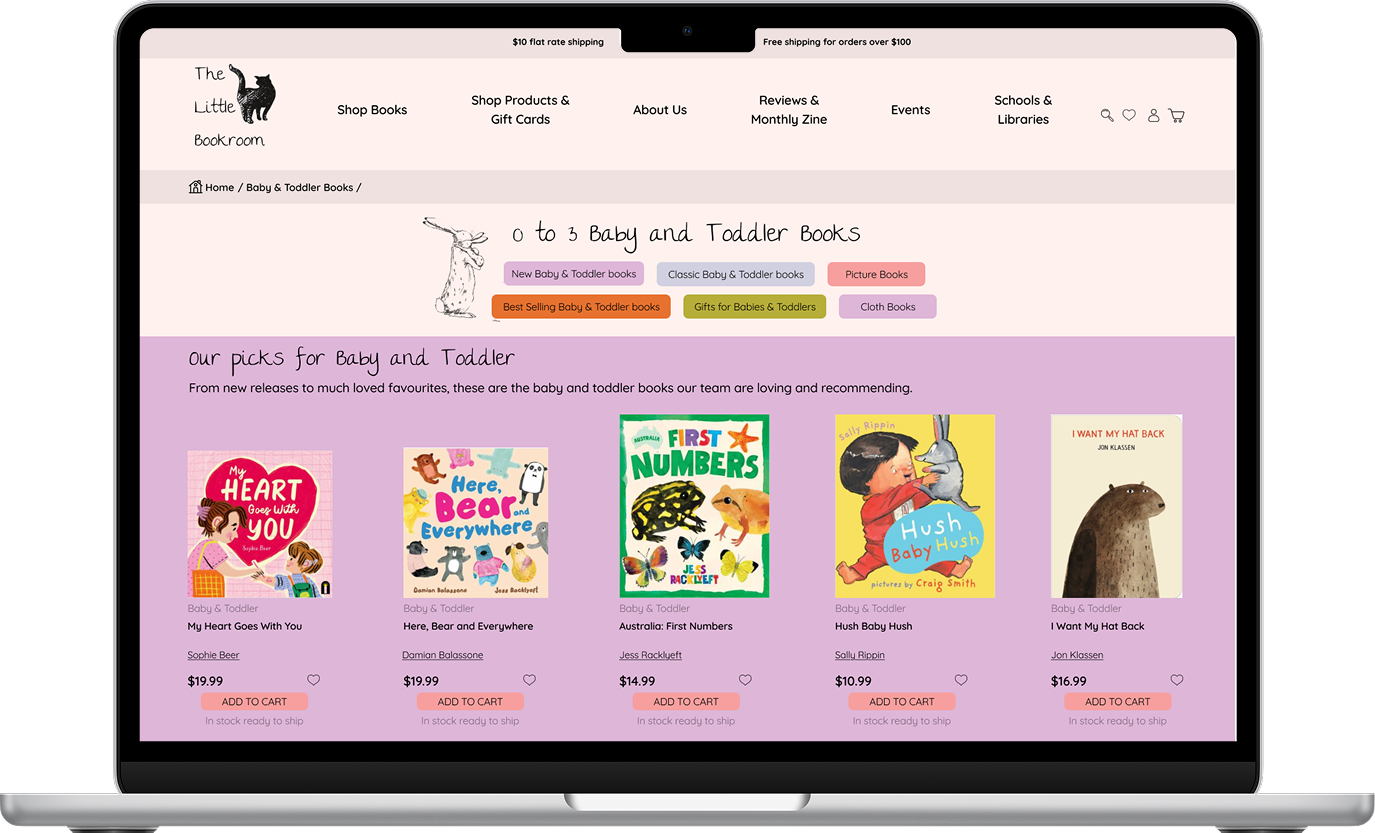
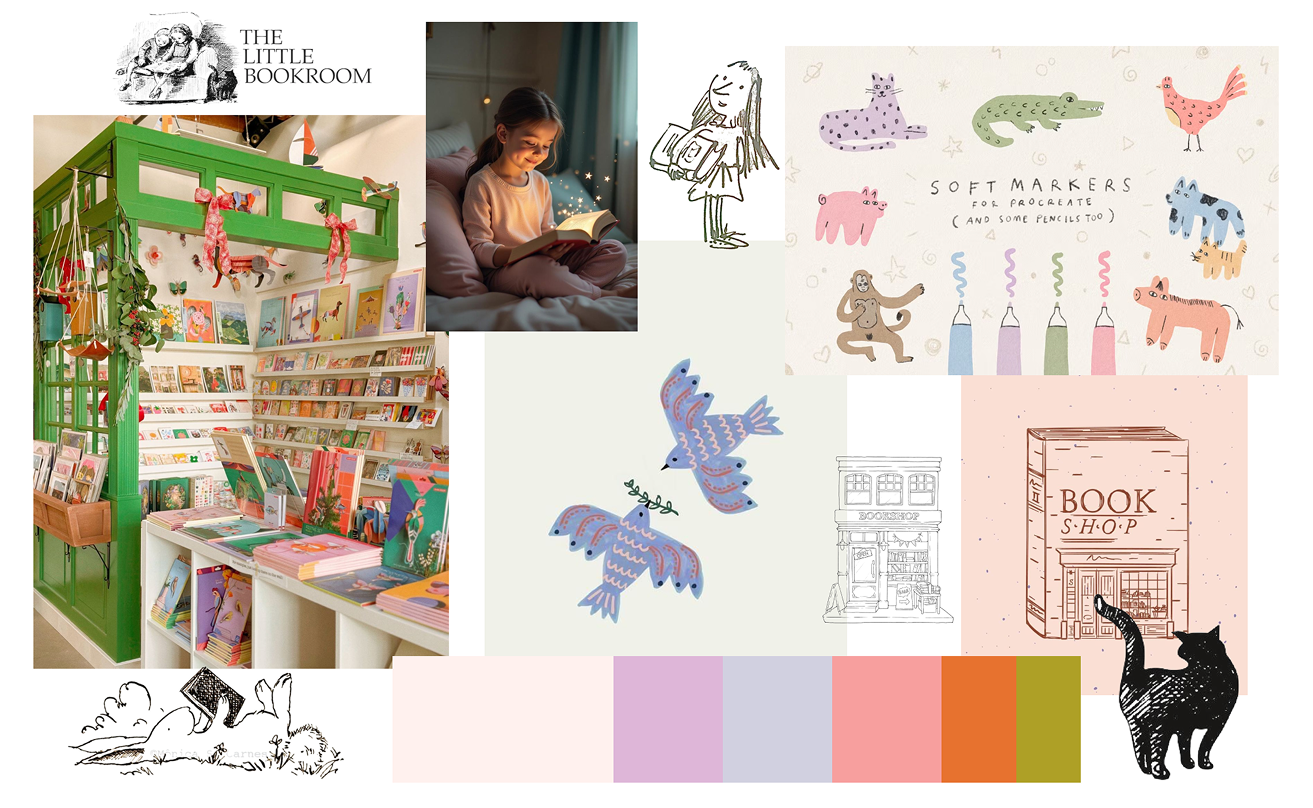
With usability validated, I defined the visual direction.
I introduced a brighter, gender-neutral colour palette and expanded the playful illustration style.
I also refined the logo using the existing cat illustration with a more playful font.
The goal was to create a warmer, more engaging experience that better reflects a children’s bookstore.


The Prototype:
The Wrap Up:
This project was about closing the gap between how parents actually shop for children’s books and how The Little Bookroom’s website asked them to. By putting age-first navigation, clearer product information and a simpler checkout at the centre of the redesign, I aimed to help time-poor parents quickly decide whether a book is right for their child, and buy with confidence.
Just as importantly, the redesign keeps what makes The Little Bookroom special: a warm, curated, trusted small shop, not a big-box retailer with better filters.